ALLPLAN start now - ROAD
ALLPLAN start now - ROAD
Course description
Learning outcomes
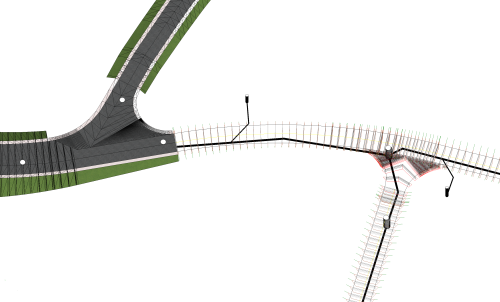
- Create and import of DTMs
- Make use of break lines to adjust triangulation
- Visualization of DTMs
- Area and point reduction of DTM

Allplan start now - BRIDGE
Allplan start now - BRIDGE
Course description
The training is designed to guide you through the modeling process for an parametrical 3D Prestressed concrete bridge model using Allplan Bridge and using Allplan Engineering for further detailing of the bridge. The used example is a hollow box concrete girder bridge with three spans. The length of the bridge is 80 meters, and the span lengths are 25, 30 and 25 meters. The bridge has two piers with variable dimensions along the height of 10 meters. The bridge axis is curved in plan and in elevation.
Learning outcomes
- General
- Axis
- Cross-Section
- Structural Members
- Variables and Variations
Modelování mostů
Modelování mostů
Course description
Learning outcomes
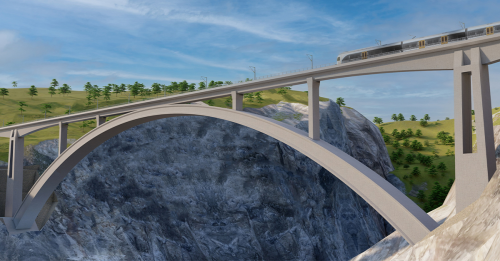
- Předpjatý most
- Prefabrikovaný most
- Železniční most
- Předpjatý most - Allplan Civil 2026

Amtliche Vermessung importieren
Amtliche Vermessung importieren
Course description
In diesem Kurs lernen Sie, wie Sie AV-Daten (Grundbuchdaten) in Allplan importieren können mit dem Geobau Favorit. Dadurch erhalten Sie in Allplan die korrekte von Layer Darstellung und können mit Zeichnunstypen arbeiten. Eine nachträgliche Aufarbeitung ist dadurch nicht mehr notwendig.
Learning outcomes
- DWG-Import
- Import-Favoriten
- Geobau
ALLPLAN Civil Fundamentals
ALLPLAN Civil Fundamentals
Course description
This introductory Self-Paced Training Course covers the fundamentals of ALLPLAN Civil. It is suitable for learners without prior experience in ALLPLAN or ALLPLAN Civil.
Learning outcomes
- Describe the basic modeling workflow of ALLPLAN Civil project.
- Describe the relationships between Axes, Cross Sections, and Structural Members.
- Define key words and terms used within ALLPLAN Civil.
- Recall the different types of Structural Members.

ALLPLAN BOOSTER GELÄNDER
ALLPLAN BOOSTER GELÄNDER
Course description
In diesem Videokurs lernen Sie, wie Sie Geländer in Allplan erstellen und platzieren.
Der Kurs beginnt mit der Erstellung eines einfachen Geländers, bestehend aus Handlauf, Pfosten, Ober- und Untergurt, Geländerfüllung und Fußplatte. Sie erfahren, wie Sie Geländer im Grundriss entwerfen und an verschiedenen Stellen wie Balkonen und Treppen platzieren.
Der Kurs behandelt auch die Erstellung von Handläufen an Wänden und zeigt, wie Sie bestehende Geländer nachträglich modifizieren können. Durch praktische und hilfreiche Tipps verbessern Sie Ihre Fähigkeiten in der Geländergestaltung.
Am Ende des Kurses werden Sie in der Lage sein, verschiedene Geländertypen effizient zu erstellen und zu platzieren, was Ihre Allplan-Kenntnisse erheblich erweitern wird.
Learning outcomes
- Funktion Geländer - Symbolleiste
- Geländer Elemente erstellen und bearbeiten
- Geländer platzieren (Grundriss, Balkon, Treppe)
- Bestehende Geländer modifizieren
Stabwerk RSX | Grundlagen
Stabwerk RSX | Grundlagen
Course description
Das
Programm RSX berechnet die Schnittkräfte und Auflagerkräfte für allgemeine
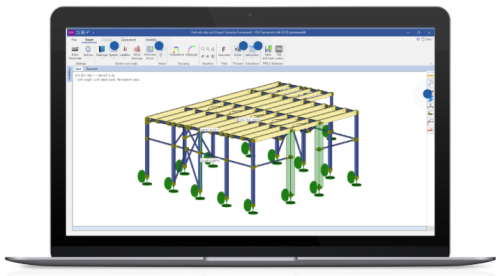
stabförmige Tragwerke als ebenes (2D) oder optional räumliches (3D) System. Lernen
Sie in diesem Tutorial die Grundlagen im RSX anhand einer einfachen Stahlhalle
mit Pultdach kennen. Wir beginnen mit der Eingabe eines einfachen räumlichen Systems
und zeigen Ihnen, wie Sie vom Programmassistenten vorgeschlagene Vorlagen
modifizieren können. Das beinhaltet die Konfiguration von Stabeigenschaften, zu
denen der Stabtyp, der Stabquerschnitt und der Stabausfall gehören. Außerdem
erfahren Sie, wie sie Stablasten und verschiedene Lastfälle (u.a. Schnee, Wind
und Schiefstellung) definieren. Anschließend kann das die Stahlhalle statisch
berechnet werden. Sie erfahren, welche Berechnungsmethoden Ihnen im Programm
zur Verfügung stehen und wie Sie die Ergebnisse in der statischen Ausgabe
abbilden können. Das Tutorial ist in der Programmversion 2022-2 entstanden.
Learning outcomes
- Programmoberfläche
- Tabellarische & grafische Eingabe
- Stabeigenschaften anpassen
- Lasten ansetzen & Lastfälle erstellen
- Verschiedene Nachweisverfahren für Berechnung

ALLPLAN Booster | Stairs
ALLPLAN Booster | Stairs
Course description
Dieser Kurs erklärt die Funktion „Treppenmodellierer“. Beginnend bei der Treppeneingabe erlernen Sie die Verwendung der Bauteile sowie die Einstellungen der Anschlüsse. Wir zeigen Modifikations-Möglichkeiten und die Anpassung der Grundrissdarstellung an individuelle Situationen.
Learning outcomes
- Eingabe verschiedener Treppentypen
- Nachträgliche Bearbeitung – z.B. Podeste einfügen
- Parameter der Bauteile und Einstellungen der Anschlüsse am Fußpunkt, Austritt und Podest
- Bearbeitungsmöglichkeiten der Grundrissdarstellung
- Räume unter Treppen für eine korrekte Wohnflächenberechnung
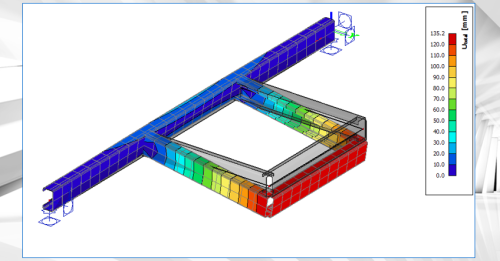
Webinar Warping effects for thin-walled and open cross-sections
Webinar Warping effects for thin-walled and open cross-sections
Course description
This webinar illustrates the finite beam element that can account for an additional degree of freedom (warping) in SCIA Engineer.
Designing slender, thin-walled, or open-section beams presents structural engineers with tough challenges. Traditional beam theories often fall short when confronted with complex torsional loads, non-uniform cross-sectional deformations, or warping effects. As projects become more ambitious, the consequences of overlooking these complex behaviors can be significant: inaccurate stress predictions, unexpected failures, and costly design revisions late in the process.
SCIA Engineer 2026 introduces a new type of finite beam element that can account for an additional degree of freedom (warping). It allows for accurate modelling of slender or thin-walled beams, open-section beams, and structures subjected to significant torsion or complex loading. This approach is important especially for bridges, steel girders, or structures with non-standard cross-sections, where warping and distortional effects play a significant role in the structural response.
As a result, engineers get more accurate predictions of stresses and deformations in cases where traditional beam elements are inadequate.
Learning outcomes
- Learn about the principles on the 7th degree of freedom (warping) in SCIA Engineer
MANUFACTON Fundamentals
MANUFACTON Fundamentals
Course description
This is a Fundamentals (Level 1) Course for MANUFACTON. It is intended for learners without prior experience in MANUFACTON. Even if you have some experience with MANUFACTON, this may be a good course to refresh on basic topics. While it is suitable for learners without prior MANUFACTON experience, some experience in preconstruction manufacturing or fabrication is strongly recommended.
Learning outcomes
- Navigate the MANUFACTON user interface.
- State the general flow of information within MANUFACTON.
- Describe the purpose of each MANUFACTON Module.
- Recall the different types and use cases of Orders.
Updating SDS2
Updating SDS2
Course description
This Course provides helpful guidance for people updating to the latest version of SDS2. It includes information on where to access the SDS2 installation files and how to move settings/preferences between versions of SDS2.
Learning outcomes
- Propose when to update to the latest version of SDS2.
- Compare the standalone and server installation options.
- Recognize types of content and preferences that can be copied between different versions.
- Plan your SDS2 update process.
ALLPLAN Civil Fondamenti
ALLPLAN Civil Fondamenti
Course description
Questo corso introduttivo di formazione autodidattica copre le nozioni fondamentali di ALLPLAN Civil. È adatto a studenti senza esperienza precedente con ALLPLAN o ALLPLAN Civil.
Learning outcomes
- Descrivere il flusso di lavoro di modellazione di base del progetto ALLPLAN Civil.
- Descrivere le relazioni tra Assi, Cross Sections e Structural Members.
- Definire le parole chiave e i termini utilizzati in ALLPLAN Civil.
- Ricordare i diversi tipi di Structural Members.