
ALLPLAN Booster | Stairs
ALLPLAN Booster | Stairs
Course description
Dieser Kurs erklärt die Funktion „Treppenmodellierer“. Beginnend bei der Treppeneingabe erlernen Sie die Verwendung der Bauteile sowie die Einstellungen der Anschlüsse. Wir zeigen Modifikations-Möglichkeiten und die Anpassung der Grundrissdarstellung an individuelle Situationen.
Learning outcomes
- Eingabe verschiedener Treppentypen
- Nachträgliche Bearbeitung – z.B. Podeste einfügen
- Parameter der Bauteile und Einstellungen der Anschlüsse am Fußpunkt, Austritt und Podest
- Bearbeitungsmöglichkeiten der Grundrissdarstellung
- Räume unter Treppen für eine korrekte Wohnflächenberechnung
Webinar Moving loads
Webinar Moving loads
Course description
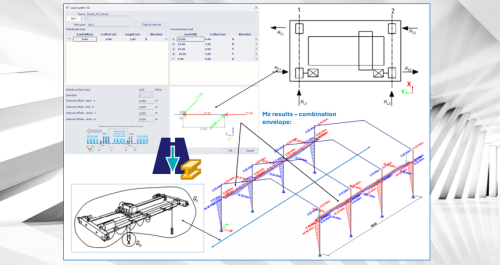
This webinar illustrates the Moving Loads functionality in SCIA Engineer.
When structures must withstand moving or shifting loads—such as traffic on bridges, cranes in industrial facilities or crowds on slabs—structural engineers face the daunting challenge of managing an overwhelming number of load combinations. Evaluating all these scenarios is not only extremely time‑consuming, it also increases the risk of overlooking critical worst‑case situations, which can result in over‑designed or unsafe structures. The Moving Loads functionality in SCIA Engineer 2026 is designed to cut through this complexity. Using the proven principles of influence lines and surfaces, it automatically identifies the most critical positions of moving load systems before calculations even start. This lets you focus your analysis and post‑processing on the truly governing cases, instead of sifting through countless non‑critical combinations. With the new Moving Loads in SCIA Engineer 2026, you can be confident that your structure is checked against its most demanding real‑world scenarios—quickly, efficiently and with precision.
Learning outcomes
- Learn about the principles on moving loads and how to apply them in SCIA Engineer