
ALLPLAN Excavation Pit Basis
ALLPLAN Excavation Pit Basis
Course description
ALLPLAN Excavation Pit is a powerful module for foundation engineering. Its intuitive functions allow users to quickly learn the basic functions. Users can easily create precise excavations by designing excavation elements according to individual requirements. The excavation offers the flexibility to easily define slope angles to achieve optimal results. With its user-friendly interface, ALLPLAN Excavation supports efficient working and thus contributes significantly to the successful realisation of construction projects.
Learning outcomes
- Specialised foundation engineering
- Earthworks
- Excavation elements
- Slope angle
- 3D surfaces

Allplan start now - Precast Elements
Allplan start now - Precast Elements
Course description
An IFC file is imported into Allplan, then a 3D element is isolated and converted into a precast wall.
The element is assigned a reinforced element plan and provided with fixtures.
Finally, the element plan is printed.
Learning outcomes
- IFC - Import
- Customize Modell
- Convert elment to precast element
- Reinforce precast element
- Customize precast element

ALLPLAN start now - Fertigteile
ALLPLAN start now - Fertigteile
Course description
Learning outcomes
- IFC - Import
- Modell anpassen
- Element zu Fertigteil umwandeln
- Fertigteil bewehren
- Fertigteil bearbeiten
ALLPLAN Precast for Beginners
ALLPLAN Precast for Beginners
Course description
Introduction to the ALLPLAN Precast Edition and its suite of tools including Precast Elements and Precast Walls.
Learning outcomes
- Describe the tools and techniques in Precast Elements.
- Describe the tools and techniques in Precast Walls.

ALLPLAN Baugrube Basis
ALLPLAN Baugrube Basis
Course description
ALLPLAN Baugrube ist ein leistungsstarkes Programmmodul für den Spezialtiefbaubereich. Mit intuitiven Funktionen ermöglicht es das schnelle Erlernen der Grundfunktionen. Nutzer können mühelos präzise Baugruben erstellen, indem sie Aushubelemente nach individuellen Anforderungen gestalten. Die Baugrube bietet die Flexibilität, Böschungswinkel einfach zu definieren, um optimale Ergebnisse zu erzielen. Durch eine benutzerfreundliche Oberfläche unterstützt ALLPLAN Baugrube effizientes Arbeiten und trägt so maßgeblich zur erfolgreichen Umsetzung von Bauprojekten bei.
Learning outcomes
- Spezialtiefbau
- Erdarbeiten
- Aushubelementen
- Böschungswinkel
- 3D-Flächen
ALLPLAN start now - Engineering
ALLPLAN start now - Engineering
Course description
Course modules:
It's that simple!
Creating the 3D building model
Modification made easy ...
Completion of the 3D building model
Evaluation
Compile and output the plan
Reinforcement
Project backup
Learning outcomes
- Create floor plans
- Components
- Opening elements
- Stairs
- Slab

ALLPLAN start now - Architektur
ALLPLAN start now - Architektur
Course description
Learning outcomes
- Grundrisse erstellen
- Entwicklung eines kompletten Gebäudes
- Gebäudekomponenten
- Öffnungselemente
- Treppen
Webinar Warping effects for thin-walled and open cross-sections
Webinar Warping effects for thin-walled and open cross-sections
Course description
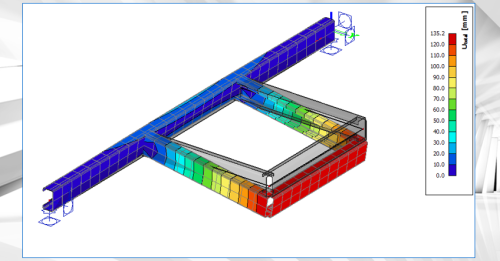
This webinar illustrates the finite beam element that can account for an additional degree of freedom (warping) in SCIA Engineer.
Designing slender, thin-walled, or open-section beams presents structural engineers with tough challenges. Traditional beam theories often fall short when confronted with complex torsional loads, non-uniform cross-sectional deformations, or warping effects. As projects become more ambitious, the consequences of overlooking these complex behaviors can be significant: inaccurate stress predictions, unexpected failures, and costly design revisions late in the process.
SCIA Engineer 2026 introduces a new type of finite beam element that can account for an additional degree of freedom (warping). It allows for accurate modelling of slender or thin-walled beams, open-section beams, and structures subjected to significant torsion or complex loading. This approach is important especially for bridges, steel girders, or structures with non-standard cross-sections, where warping and distortional effects play a significant role in the structural response.
As a result, engineers get more accurate predictions of stresses and deformations in cases where traditional beam elements are inadequate.
Learning outcomes
- Learn about the principles on the 7th degree of freedom (warping) in SCIA Engineer
Tutorial Concrete
Tutorial Concrete
Course description
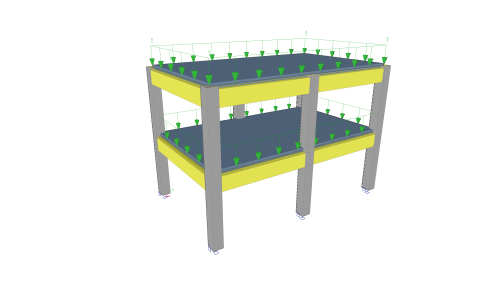
This tutorial describes the basic functions of SCIA Engineer for the input, analysis and design of a 3D concrete structure with 1D and 2D elements.
Before you start, you must be familiar with your operating system: for instance working with dialogues, menu bars, toolbars, status bars, handling the mouse, etc.
First, we will explain how to create a new project and how to setup your structure.
After the geometry and load input, the structure will be calculated and the results can be viewed.
Next, we will discuss the concrete settings and we will perform the concrete design for 1D and 2D elements.
The tutorial ends with a brief introduction to the engineering report.
Learning outcomes
- The user will be able to model and analyse a concrete structure.

ALLPLAN start now - Ingenieurbau
ALLPLAN start now - Ingenieurbau
Course description
Learning outcomes
- Grundrisse erstellen
- Bauteile
- Öffnungselemente
- NDW-Importe
- Plan zusammenstellen und ausgeben

ALLPLAN start now - Architecture
ALLPLAN start now - Architecture
Course description
Course modules:
It's that simple!
Create the 3D building model
Modification made easy...
Evaluation
Completion of the 3D building model
Compile and Output Plan
Project Backup
Learning outcomes
- Create floor plans
- Develop a complete building
- Building components
- Opening elements
- Stairs

ALLPLAN BEST PRACTISE | Objekte- und Informationspalette
ALLPLAN BEST PRACTISE | Objekte- und Informationspalette
Course description
Lernen Sie in dieser Best Practise Session die Vorteile der Objekte- und Informationspalette kennen.
Die Objektpalette bietet eine kompakte und übersichtliche Darstellung aller Bestandteile eines virtuellen Gebäudemodells mit weitreichenden Steuerungs-, Modifikations- und Kontrollmöglichkeiten von Elementen.
Die Informationspalette ist ein tabellenbasiertes Werkzeug, mit dem Objekte und zugehörige Attribute schnell, einfach und sicher angezeigt, verglichen, validiert und geändert werden können.
Learning outcomes
- Objektepalette: Sortierkriterien, Aktivierung und Sichtbarkeitssteuerung von Objekten
- Objektepalette: Farbcodierung, Modifikationsmöglichkeiten
- Informationspalette: Einlesen von Informationen, Filter- und Suchkriterien
- Informationspalette: Anzeigemöglichkeiten der Tabelle, Multi Edit