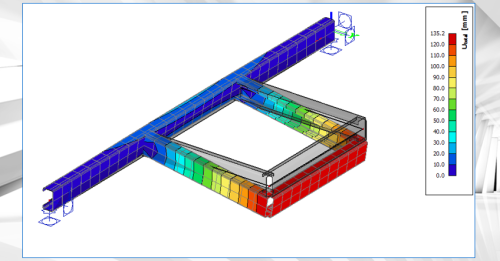
Webinar Warping effects for thin-walled and open cross-sections
Webinar Warping effects for thin-walled and open cross-sections
Course description
This webinar illustrates the finite beam element that can account for an additional degree of freedom (warping) in SCIA Engineer.
Designing slender, thin-walled, or open-section beams presents structural engineers with tough challenges. Traditional beam theories often fall short when confronted with complex torsional loads, non-uniform cross-sectional deformations, or warping effects. As projects become more ambitious, the consequences of overlooking these complex behaviors can be significant: inaccurate stress predictions, unexpected failures, and costly design revisions late in the process.
SCIA Engineer 2026 introduces a new type of finite beam element that can account for an additional degree of freedom (warping). It allows for accurate modelling of slender or thin-walled beams, open-section beams, and structures subjected to significant torsion or complex loading. This approach is important especially for bridges, steel girders, or structures with non-standard cross-sections, where warping and distortional effects play a significant role in the structural response.
As a result, engineers get more accurate predictions of stresses and deformations in cases where traditional beam elements are inadequate.
Learning outcomes
- Learn about the principles on the 7th degree of freedom (warping) in SCIA Engineer

Allplan start now - BRIDGE
Allplan start now - BRIDGE
Course description
The training is designed to guide you through the modeling process for an parametrical 3D Prestressed concrete bridge model using Allplan Bridge and using Allplan Engineering for further detailing of the bridge. The used example is a hollow box concrete girder bridge with three spans. The length of the bridge is 80 meters, and the span lengths are 25, 30 and 25 meters. The bridge has two piers with variable dimensions along the height of 10 meters. The bridge axis is curved in plan and in elevation.
Learning outcomes
- General
- Axis
- Cross-Section
- Structural Members
- Variables and Variations
ALLPLAN Civil for Beginners
ALLPLAN Civil for Beginners
Course description
This course covers aspects related to day-to-day work in ALLPLAN Civil. Before taking this course, learners should have a fundamental understanding of both ALLPLAN and ALLPLAN Civil.
Learning outcomes
- Import and adjust Axes.
- Modify the Cross Sections used by Structural Members.
- Place Structural Members from Templates.
- Apply expressions and Variations to Structural Members.
ALLPLAN Civil Fundamentals
ALLPLAN Civil Fundamentals
Course description
This introductory Self-Paced Training Course covers the fundamentals of ALLPLAN Civil. It is suitable for learners without prior experience in ALLPLAN or ALLPLAN Civil.
Learning outcomes
- Describe the basic modeling workflow of ALLPLAN Civil project.
- Describe the relationships between Axes, Cross Sections, and Structural Members.
- Define key words and terms used within ALLPLAN Civil.
- Recall the different types of Structural Members.

SCIA Engineer
SCIA Engineer
Course description
Welcome
to the SCIA section, where you will be introduced to SCIA Engineer and guided
to key sources of important information.
Learning outcomes
- Understand the basics of SCIA Engineer
- Explain the key value drivers and differentiators of SCIA Engineer
- Apply the defined Sales Process
- Identify and use core sales resources
CRM Dynamics 365
CRM Dynamics 365
Course description
Welcome to the CRM Dynamics section, where you will find all training collateral needed to get started. These will help you get to understand the basics of this tool as quickly as possible.
Learning outcomes
- Welcome to the CRM Dynamics section, where you will find all training collateral needed to
ALLPLAN Civil per principianti
ALLPLAN Civil per principianti
Course description
Questo corso tratta aspetti relativi al lavoro quotidiano in ALLPLAN Civil. Prima di frequentare questo corso, gli studenti devono avere una conoscenza di base sia di ALLPLAN che di ALLPLAN Civil.
Learning outcomes
- Importa e regola gli Axes.
- Modifica Cross Sections utilizzate dagli Structural Members.
- Posizionare gli Structural Members dai Templates.
- Applicare espressioni e Variations agli Structural Members.

ALLPLAN start now - Engineering
ALLPLAN start now - Engineering
Course description
Course modules:
It's that simple!
Creating the 3D building model
Modification made easy ...
Completion of the 3D building model
Evaluation
Compile and output the plan
Reinforcement
Project backup
Learning outcomes
- Create floor plans
- Components
- Opening elements
- Stairs
- Slab

ALLPLAN start now - Architecture
ALLPLAN start now - Architecture
Course description
Course modules:
It's that simple!
Create the 3D building model
Modification made easy...
Evaluation
Completion of the 3D building model
Compile and Output Plan
Project Backup
Learning outcomes
- Create floor plans
- Develop a complete building
- Building components
- Opening elements
- Stairs
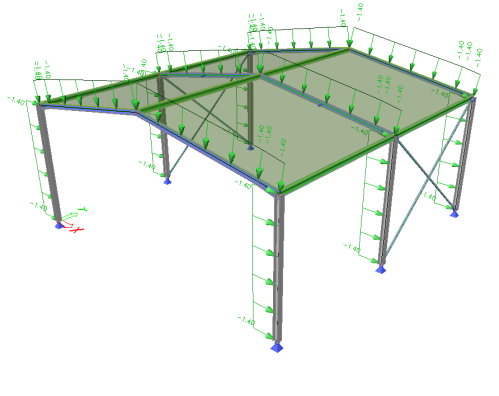
Tutorial Steel
Tutorial Steel
Course description
This tutorial describes the basic functions of SCIA Engineer for the input, analysis and design of a 3D steel structure.
Before you start, you must be familiar with your operating system: for instance working with dialogues, menu bars, toolbars, status bars, handling the mouse, etc.
First, we will explain how to create a new project and how to setup your structure.
After the geometry and load input, the structure will be calculated and the results can be viewed.
Next, we will discuss the steel settings and we will perform the steel code checks according Eurocode 3.
The tutorial ends with a brief introduction to the engineering report.
Learning outcomes
- Navigate the interface.
- Model a basic steel structure and add loads.
- Perform a linear analysis and display results.
- Perform the ULS steel check.
ALLPLAN Fundamentals
ALLPLAN Fundamentals
Course description
This introductory Self-Paced Training Course covers the fundamentals of ALLPLAN. It is suitable for leaners without prior experience in ALLPLAN.
Learning outcomes
- Recall basic Project-related administrative settings.
- Describe how Drawing Files are used to organize content in a Project.
- Identify best use cases for Library Elements and Wizards.
- State how model information can be organized and presented using Legends or Reports.
MANUFACTON Fundamentals
MANUFACTON Fundamentals
Course description
This is a Fundamentals (Level 1) Course for MANUFACTON. It is intended for learners without prior experience in MANUFACTON. Even if you have some experience with MANUFACTON, this may be a good course to refresh on basic topics. While it is suitable for learners without prior MANUFACTON experience, some experience in preconstruction manufacturing or fabrication is strongly recommended.
Learning outcomes
- Navigate the MANUFACTON user interface.
- State the general flow of information within MANUFACTON.
- Describe the purpose of each MANUFACTON Module.
- Recall the different types and use cases of Orders.