
ALLPLAN BEST PRACTISE | Opening-Parts
ALLPLAN BEST PRACTISE | Opening-Parts
Course description
Opening-Parts in ALLPLAN sind parametrische Bauteile, die eine deutlich effizientere und flexiblere Modellierung ermöglichen als herkömmliche CAD-Objekte. In dieser Best Practise Session lernen Sie praxisnah, wie Sie mit Opening-Parts Fenster und Türen schnell und präzise modellieren können.
Learning outcomes
- Einfache Erzeugung unterschiedlichster Fenster- und Türelemente
- Sonderfälle wie Eck- und Kastenfenster sowie Dreh-, Falt- und Schiebetüren
- Einfache Anpassung der Darstellung
- Multi-Editing
ALLPLAN Fundamentals
ALLPLAN Fundamentals
Course description
This introductory Self-Paced Training Course covers the fundamentals of ALLPLAN. It is suitable for leaners without prior experience in ALLPLAN.
Learning outcomes
- Recall basic Project-related administrative settings.
- Describe how Drawing Files are used to organize content in a Project.
- Identify best use cases for Library Elements and Wizards.
- State how model information can be organized and presented using Legends or Reports.

ALLPLAN BEST PRACTISE | Kreatives Entwerfen und Visualisieren
ALLPLAN BEST PRACTISE | Kreatives Entwerfen und Visualisieren
Course description
In dieser Best Practise Session erfahren Sie, wie Sie die leistungsstarken Funktionen von ALLPLAN gezielt für den architektonischen Entwurf und die Visualisierung Ihrer Gebäude nutzen können.
Learning outcomes
- Grundlegende Möglichkeiten des freien Modellierens
- Was ist der AI Visualizer?
- Die unterschiedlichen Ansichtsarten von ALLPLAN
- Umgebungseinstellungen
- Oberflächen gestalten & Content Connector
MasterSap4U e ALLPLAN: La giusta sinergia nei tuoi processi BIM
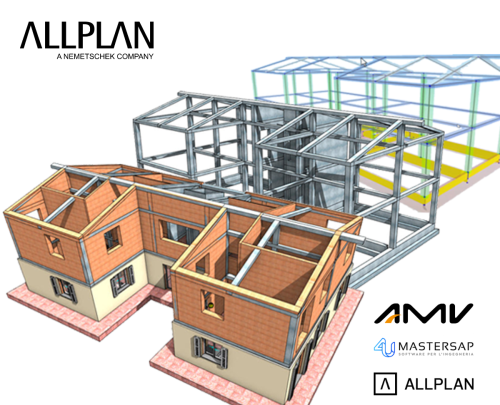
MasterSap4U e ALLPLAN: La giusta sinergia nei tuoi processi BIM
Course description
Scopri come passare dal modello BIM geometrico a quello analitico in
modo efficace, grazie all’integrazione tra ALLPLAN, MasterSap 4U 2025
attraverso i formati IFC e SAF. Un flusso di lavoro BIM che ti permette
di progettare riducendo i tempi di modellazione ed evitando errori
progettuali.
Learning outcomes
- Integrazione Mastersap4U e ALLPLAN

BACK 2 SCHOOL | ALLPLAN | INGENIERIE
BACK 2 SCHOOL | ALLPLAN | INGENIERIE
Course description
Découverte d'ALLPLAN à destination des étudiant
Learning outcomes
- Interface
- Dessin
- Les plans de références
- Modélisation
- Créer les livrables
Webinar Warping effects for thin-walled and open cross-sections
Webinar Warping effects for thin-walled and open cross-sections
Course description
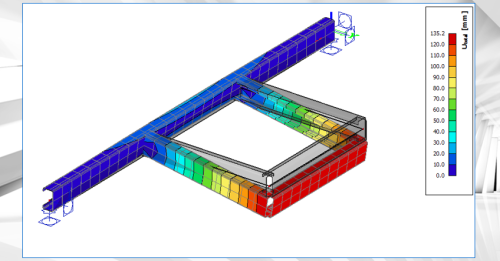
This webinar illustrates the finite beam element that can account for an additional degree of freedom (warping) in SCIA Engineer.
Designing slender, thin-walled, or open-section beams presents structural engineers with tough challenges. Traditional beam theories often fall short when confronted with complex torsional loads, non-uniform cross-sectional deformations, or warping effects. As projects become more ambitious, the consequences of overlooking these complex behaviors can be significant: inaccurate stress predictions, unexpected failures, and costly design revisions late in the process.
SCIA Engineer 2026 introduces a new type of finite beam element that can account for an additional degree of freedom (warping). It allows for accurate modelling of slender or thin-walled beams, open-section beams, and structures subjected to significant torsion or complex loading. This approach is important especially for bridges, steel girders, or structures with non-standard cross-sections, where warping and distortional effects play a significant role in the structural response.
As a result, engineers get more accurate predictions of stresses and deformations in cases where traditional beam elements are inadequate.
Learning outcomes
- Learn about the principles on the 7th degree of freedom (warping) in SCIA Engineer

Novità ALLPLAN 2026
Novità ALLPLAN 2026
Course description
ALLPLAN Italia è entusiasta di condividere con tutti i professionisti le videopillole di formazione sulle novità introdotte in ALLPLAN 2026 per la progettazione BIM. Grazie a questi brevi video, potrai scoprire le più recenti novità per la progettazione multidisciplinare e per la collaborazione BIM. Le pillole di formazione sono ordinate in 6 macro categorie.
Learning outcomes
- Usabilità, BIM, Interoperabilità, Modellazione, Documentazione e Cloud
Webinar Moving loads
Webinar Moving loads
Course description
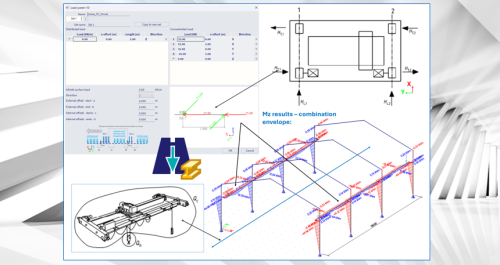
This webinar illustrates the Moving Loads functionality in SCIA Engineer.
When structures must withstand moving or shifting loads—such as traffic on bridges, cranes in industrial facilities or crowds on slabs—structural engineers face the daunting challenge of managing an overwhelming number of load combinations. Evaluating all these scenarios is not only extremely time‑consuming, it also increases the risk of overlooking critical worst‑case situations, which can result in over‑designed or unsafe structures. The Moving Loads functionality in SCIA Engineer 2026 is designed to cut through this complexity. Using the proven principles of influence lines and surfaces, it automatically identifies the most critical positions of moving load systems before calculations even start. This lets you focus your analysis and post‑processing on the truly governing cases, instead of sifting through countless non‑critical combinations. With the new Moving Loads in SCIA Engineer 2026, you can be confident that your structure is checked against its most demanding real‑world scenarios—quickly, efficiently and with precision.
Learning outcomes
- Learn about the principles on moving loads and how to apply them in SCIA Engineer
Webinar Footfall analysis
Webinar Footfall analysis
Course description
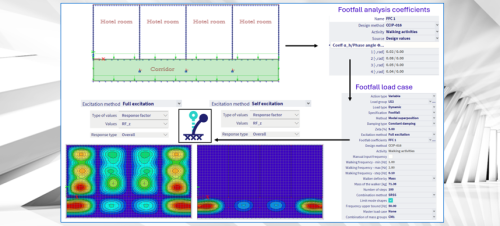
This webinar illustrates the Footfall Analysis functionality in SCIA Engineer.
Many engineers face significant challenges when designing buildings with large open spaces, lightweight floors, or areas housing sensitive equipment. Vibrations caused by everyday human activities—like walking, running, or crowd movement—can lead to occupant discomfort, dissatisfied clients, or even operational problems for sensitive equipment.
Footfall analysis allows engineers to evaluate how the structure responds to these human-induced vibrations. With the insights gained from this analysis, engineers can adjust the structural design early in the project to keep vibrations within acceptable limits, ensuring occupants’ comfort and protecting sensitive equipment. This proactive approach helps avoid costly modifications after construction that might otherwise be required to address unsatisfactory structural performance.
Learning outcomes
- Learn about the principles on footfall analysis and how to apply it in SCIA Engineer
ALLPLAN Civil Fondamenti
ALLPLAN Civil Fondamenti
Course description
Questo corso introduttivo di formazione autodidattica copre le nozioni fondamentali di ALLPLAN Civil. È adatto a studenti senza esperienza precedente con ALLPLAN o ALLPLAN Civil.
Learning outcomes
- Descrivere il flusso di lavoro di modellazione di base del progetto ALLPLAN Civil.
- Descrivere le relazioni tra Assi, Cross Sections e Structural Members.
- Definire le parole chiave e i termini utilizzati in ALLPLAN Civil.
- Ricordare i diversi tipi di Structural Members.
SDS2 Onboarding
SDS2 Onboarding
Course description
The SDS2 Onboarding Course guides new users through the essential steps to get started with SDS2. You will learn how to:
✅ Create a SDS2 account to access resources and support.
✅ Manage and activate your licenses for seamless usage.
✅ Download and install SDS2 on your system.
✅ Get familiar with the basics of SDS2, including navigation and essential tools.
By the end of this course, you'll be ready to start your first project with confidence!
Learning outcomes
- Creating your SDS2 account
- Managing your licenses
- Insatalling SDS2
ALLPLAN Civil per principianti
ALLPLAN Civil per principianti
Course description
Questo corso tratta aspetti relativi al lavoro quotidiano in ALLPLAN Civil. Prima di frequentare questo corso, gli studenti devono avere una conoscenza di base sia di ALLPLAN che di ALLPLAN Civil.
Learning outcomes
- Importa e regola gli Axes.
- Modifica Cross Sections utilizzate dagli Structural Members.
- Posizionare gli Structural Members dai Templates.
- Applicare espressioni e Variations agli Structural Members.